

We’ve all been there: that feeling when your stomach drops realizing that you just lost a precious photo or memory, and you can’t get it back. That’s why backups are important, but recovery is often possible.
Android and iPhone data recovery tools have come a long way over the years, and today you can restore files in a lot of cases, especially if you try soon after any problems.
I tested Stellar Data Recovery for Android and iPhone, and it’s versatile software for retrieving deleted files, from photos and videos, to music, messages, contacts, WhatsApp chats, and other media.
Phone and computer compatibility
Android data recovery software and iPhone data recovery software is software that you install on your Windows or Apple computer, supported for installation on Windows 7, 8.1, 10, and 11, and macOS Sequoia 15, Sonoma 14, Ventura 13, Monterey 12, and below.
The Android version supports Android 6 up to Android version 14, and all Android model phones, from Samsung, Pixel, and OPPO, to OnePlus and more.
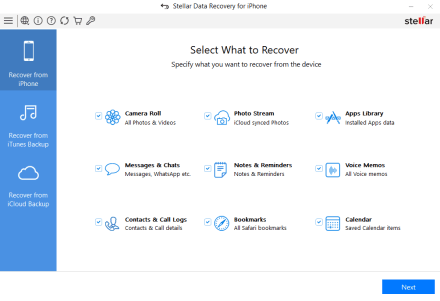
The iPhone version supports all recent models of the phones, including iPhone Series 11 to 16, and iOS 12 to 18.
Software installation is quick and easy. From the website you can download the software, and once setup it will provide instructions to connect your phone.
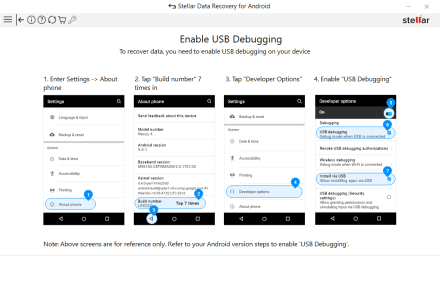
It’s notable that, for the ideal recovery, you will need to make a change on your device so the software can access and restore data.
I found installation incredibly easy, and it took less than two minutes from download to running the software.
Recovery steps and restoration
Once the software is running, you’ll connect your phone via USB to your computer and run the recovery. At this point, you can select what types of files or items that you want to try and restore, and it will start scanning your phone.
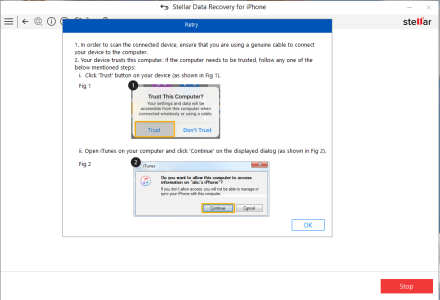
The only step that you’ll have to follow additional instructions is changing some settings on your phone, so the software can access your storage. On Android this requires a couple of changes, while iPhone is somewhat simpler.
The software promises to help in a wide range of situations, and that includes accidental deletion, when the operating system crashes, physical damage, broken screens, malware, or recovering WhatsApp messages when changing devices.
I couldn’t test all of those scenarios, but I did delete a number of files and then cleared my trash on the phone, and then attempted recovery.
The software scanned the phones for about a minute, and then showed the results. In those results I could look at what was found before attempting recovery, and overall the software performed very well.
I deleted contacts, messages, photos, and videos. In all of the cases, I found that the software performed best at recovering photos and videos, especially the most recent ones. As you use your device, deleted data can be overwritten with normal use, and those files are very difficult to restore. The best use case scenario for the Android and iPhone recovery software would be to attempt to restore data as soon as you realize that it’s deleted or there’s a problem.
Once you select everything you want to restore, the software will ask you where to restore the files, and it will process the recovery in a few minutes, depending on the amount of data and how large the files are. Restoring around 5 GB from my phones took less than 3 minutes.
Final thoughts
There are a lot of factors to consider whether you will be successful restoring lost files from your phone, but Stellar Data Recovery worked well for me. It’s impossible for the software to restore everything, but I found the results were good, especially within hours or up to a day or two of deleting files.
I have used a lot of software and tools over the years, and this is one of the simplest to install and use, so you won’t need to be an expert. You will just need to follow instructions for installation, and connecting to your phone.
If you need a little more support, I would recommend watching the videos on YouTube for iPhone recovery, and Android recovery.
