

There’s a persistent romantic notion of filmmaking; a lone creator with a camera and a dream, needing only intuition and a good eye. In practice, it leads to terrible results in filmmaking though.
The truth is that the craft runs on infrastructure. Great ideas stall without the right filmmaking tools to move them from concept to screen. And the good news–genuinely good news–is that the infrastructure available to independent and aspiring filmmakers today is the best that it’s ever been. Much of it is free, or close to it. Most of it runs on a laptop or a phone.
The barrier isn’t access anymore; it’s knowing where to look.
Before the camera: Pre-production tools that do the heavy lifting
Most people skip straight to the exciting part: the camera, the edit, and the final cut. That’s why most people also end up on set confused, behind schedule, and missing half the shots they planned. Pre-production isn’t glamorous. It’s also the difference between a chaotic shoot and a functional one.
Celtx has become a go-to pre-production platform for independent filmmakers working without a dedicated production office. It handles screenwriting, scheduling, and budgeting inside a single cloud-based hub. The formatting is industry-standard, which matters when sharing scripts with collaborators who expect proper slug lines and action blocks. For a solo creator or a small crew, it removes the need for multiple separate documents living in different places and never quite syncing up.
StudioBinder is in a little higher professional category and is worth learning about, even if the free plan has limits. It is often used in commercial and independent television productions for call sheets, shooting schedules, and screenplay breakdowns. The interface is sleek, and the outputs seem professional, and when delivering papers to crew members or customers, matters more than it should.
Converting, fixing, and preparing footage
Here’s a workflow issue that catches practically every rookie filmmaker off guard: video enters from many cameras, devices, and formats, and the editing software doesn’t always want to work with all of them. This is a logistical challenge more than a creative one, and the answers are obvious.
Movavi Video Converter handles format conversion reliably and without a steep learning curve, which matters when the priority is getting into the edit rather than troubleshooting codec errors. It supports a wide range of input and output formats, and for creators working across multiple platforms, having a dependable video converter in the toolkit saves a surprising amount of time. Similarly, needing to rotate video online after shooting vertical footage in the wrong orientation is a minor but real occurrence, and browser-based tools handle it without requiring software installation.
These aren’t the glamorous tools. But the absence of them, at the wrong moment, is genuinely painful.
The editing question: Where to actually learn the craft
The video editor conversation for aspiring filmmakers often circles around the same few names. What gets underrepresented is Lightworks, a professional non-linear editing system with a genuinely impressive history. It was used editing Pulp Fiction, The Wolf of Wall Street, and Mad Max: Fury Road, among others. The free version has real limitations on export resolution, but as a learning environment for understanding professional video making software workflows, it’s legitimate in a way that many free tools aren’t.
The learning curve is steeper than consumer-grade editors. That’s also the point. Time spent learning Lightworks builds instincts that transfer to any other professional NLE. The friction is the education.
Collaboration tools: Because filmmaking is never solo
Frame.io changed how video teams share and review footage when it launched. It’s a cloud-based application for reviewing and working together that lets editors share cuts, consumers give time-coded comments, and teams deal with feedback without having to deal with email threads and files that don’t match.
For aspiring filmmakers working with clients, agencies, or remote collaborators, understanding Frame.io is increasingly a professional expectation rather than a bonus skill. The filming equipment and the edit suite matter, but so does the ability to communicate professionally about the work in progress.
Dropbox, meanwhile, remains the unglamorous backbone of countless productions. Large video files need to live somewhere accessible to multiple people. Dropbox’s reliability and its integration with other creative tools make it the default for a reason. Not exciting. Indispensable.
Filming With Your Phone: A Real Filmmaking Choice
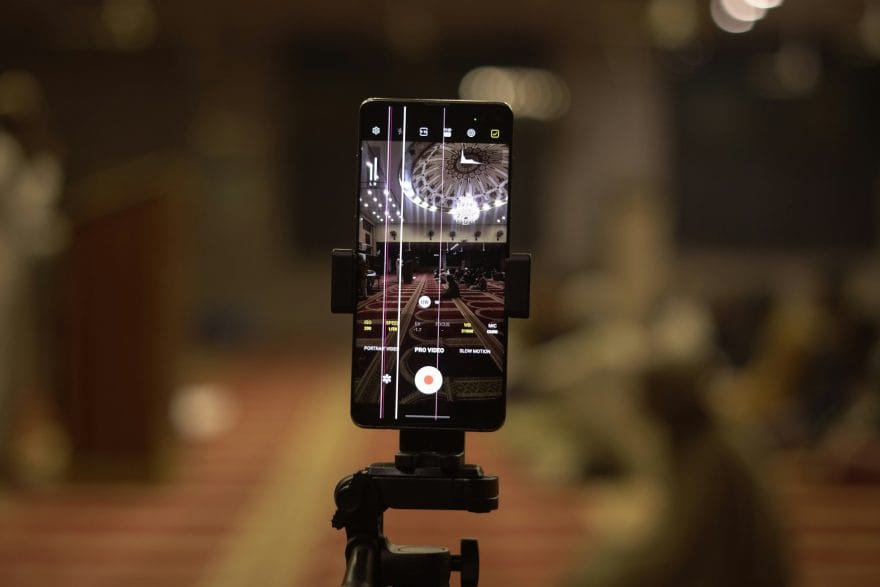
The term “filming with your phone” still has a little stigma in some filmmaking circles, which is becoming more difficult to defend. The iPhone 15 Pro captures ProRes video. The Samsung Galaxy S24 Ultra delivers video that, under controlled settings, matches specialist cinema cameras priced $5,000.
Netflix has even given approval for smartphone footage in some films. This matters particularly for the growing conversation around female filmmaking and broader access to the craft. The financial barrier of professional film equipment has historically excluded enormous portions of the global filmmaking population. When a device that lives in a pocket can produce broadcast-quality footage, the conversation about who gets to make films shifts; slowly, but meaningfully.
Some of the most discussed short films in recent festival circuits were shot entirely on mobile devices. The tool is legitimate. The storytelling always was.
Video making apps round out the pipeline
The aspiring filmmaker who understands the full pipeline–from pre-production planning through format conversion to collaborative review–operates at a different level than one who only knows how to shoot and roughly edit. The tools aren’t a substitute for vision. But vision without functional tools stays exactly where it started: in someone’s head. That’s a waste. And entirely avoidable.
